Showing posts with label mobile. Show all posts

Saturday, February 8, 2014

Unlock an Android Pattern of your Friends Android Mobile

Unlock an Android Pattern

Unlock an Android Pattern


Android is most used OS in the cell phone today’s everybody use android  phones now days. this is a android is LINUX based operating system provide by Google. android phones is very easy to access there is lot of companies who sell android phones. Biggest seller of android is Samsung and HTC and many other who made android based phones. today everyone wants higher configuration phones so there is lot of phones today i like s3 and Samsung note these phones are very fast and good to use but little expensive for everyone. in today there is lot of  apps for android  available for Google play store you can download free of coast of buy some apps very easily . How To Unlock an Android Pattern  droid  phones is easy to accessible and you can play everything in  this phones there is thousands of  app for android  is available in the play store there is many inbuilt apps available for most android p hones .there is many ways to give security to your phones with some apps you can use inbuilt unlock pattern or  unlock codes  for easy security you can also download some  unlock codes  app from play store easily.. there is lot of games available for phones the most used app is TEMPLE RUN 2 and many other  these are free of cost apps available for everyone in the play store app in the  android  phones.  Now look  How To Unlock an Android Pattern . . - 

Android Phone

Android Phone


How to Unlock an Andriod Pattern?


Today many android phone user use the inbuilt unlock pattern for give security to there phones this is very easy to use but some time to take many wrong attempts it locked permanently after that you need to enter the user id you enter in the google play store to unlock phone but there is some problems to unlock again if u stop data usage in your so it can’t be connected with internet and then you cannot unlock phone without this trick. sometime user needs to go to Samsung care center and then give some money to unlock it again so this is costly you need to pay here i gona give you a trick How To Unlock an Android Pattern  Just follow these simple steps to unlock your phone and use again free of cost.
Android Unlock Pattern

Android Unlock Pattern

  1.  Phone want you to enter the user email id you enter in the play store.
  2.  But you don’t know the email id.
  3. Then just don’t worry just follow these steps.
  4. Just switch off your android phone and then wait for second to switched of it.
  5. Then first click Up Volume Key and hold it.
  6. Then click on home button and hold it.
  7. Then press the power button and after is started just release it.
  8. And then you can see you enter in the secret android menu you never see it before.
  9. Just click on home button for up and down in the menu.
  10. Then just go to third option named as DELETE ALL USER DATA.
  11. Then it takes some time.
  12. The phone will be started and the unlock pattern problem is fixed.
This is How To Unlock an Android Pattern.


Read More..

Tuesday, November 12, 2013

Unknown Android Mobile Secret Codes

Android Secret Codes

Universal Android Secret Codes


1. Complete Information About your Phone

*#*#4636#*#*

This code can be used to get some interesting information about your phone and battery. It shows following 4 menus on screen:

Phone information
Battery information
Battery history
Usage statistics

2. Factory data reset

*#*#7780#*#*

This code can be used for a factory data reset. Itll remove following things:

Google account settings stored in your phone
System and application data and settings
Downloaded applications

It’ll NOT remove:

Current system software and bundled application
SD card files e.g. photos, music files, etc.

Note: Once you give this code, you get a prompt screen asking you to click on “Reset phone” button. So you get a chance to cancel your operation.

3. Format Android Phone

*2767*3855#

Think before you give this code. This code is used for factory format. Itll remove all files and settings including the internal memory storage. It’ll also reinstall the phone firmware.
Note: Once you give this code, there is no way to cancel the operation unless you remove the battery from the phone. So think twice before giving this code.
4. Phone Camera Update

*#*#34971539#*#*

This code is used to get information about phone camera. It shows following 4 menus:

Update camera firmware in image (Dont try this option)
Update camera firmware in SD card
Get camera firmware version
Get firmware update count

WARNING: Never use the first option otherwise your phone camera will stop working and you’ll need to take your phone to service center to reinstall camera firmware.

5. End Call/Power

*#*#7594#*#*

This one is my favorite one. This code can be used to change the “End Call / Power” button action in your phone. Be default, if you long press the button, it shows a screen asking you to select any option from Silent mode, AirPlane mode and Power off.
You can change this action using this code. You can enable direct power off on this button so you dont need to waste your time in selecting the option.

6. File Copy for Creating Backup

*#*#273283*255*663282*#*#*

This code opens a File copy screen where you can backup your media files e.g. Images, Sound, Video and Voice memo.

7. Service Mode

*#*#197328640#*#*

This code can be used to enter into Service mode. You can run various tests and change settings in the service mode.

8. WLAN, GPS and Bluetooth Test Codes:

*#*#232339#*#* OR *#*#526#*#* OR *#*#528#*#* – WLAN test (Use “Menu” button to start various tests)

*#*#232338#*#* – Shows WiFi MAC Address
*#*#1472365#*#* – GPS test
*#*#1575#*#* - Another GPS test
*#*#232331#*#* – Bluetooth test
*#*#232337#*# – Shows Bluetooth device address

9. Codes to get Firmware version information:

*#*#4986*2650468#*#* - PDA, Phone, H/W, RF CallData
*#*#1234#*#* - PDA and Phone
*#*#1111#*#* - FTA SW Version
*#*#2222#*#* - FTA HW Version
*#*#44336#*#* - PDA, Phone, CSC, Build Time, Changelist number

10. Codes to launch various Factory Tests:

*#*#0283#*#* - Packet Loopback
*#*#0*#*#* - LCD test
*#*#0673#*#* OR *#*#0289#*#* - Melody test
*#*#0842#*#* - Device test (Vibration test and BackLight test)
*#*#2663#*#* - Touch screen version
*#*#2664#*#* - Touch screen test
*#*#0588#*#* - Proximity sensor test
*#*#3264#*#* - RAM version
Read More..

Thursday, November 7, 2013

PowerDVD Mobile v 4 v4 0 17944 Apk Full App

PowerDVD Mobile v.4 v4.0.17944
Requirements: 2.3 and up
Overview: Enjoying multimedia on-the-go has never been so easy. PowerDVD Mobile brings the award-winning features of CyberLink PowerDVD to Android tablets and smartphones so that you can watch movies, view photos, and listen to music in the best quality, wherever you are!
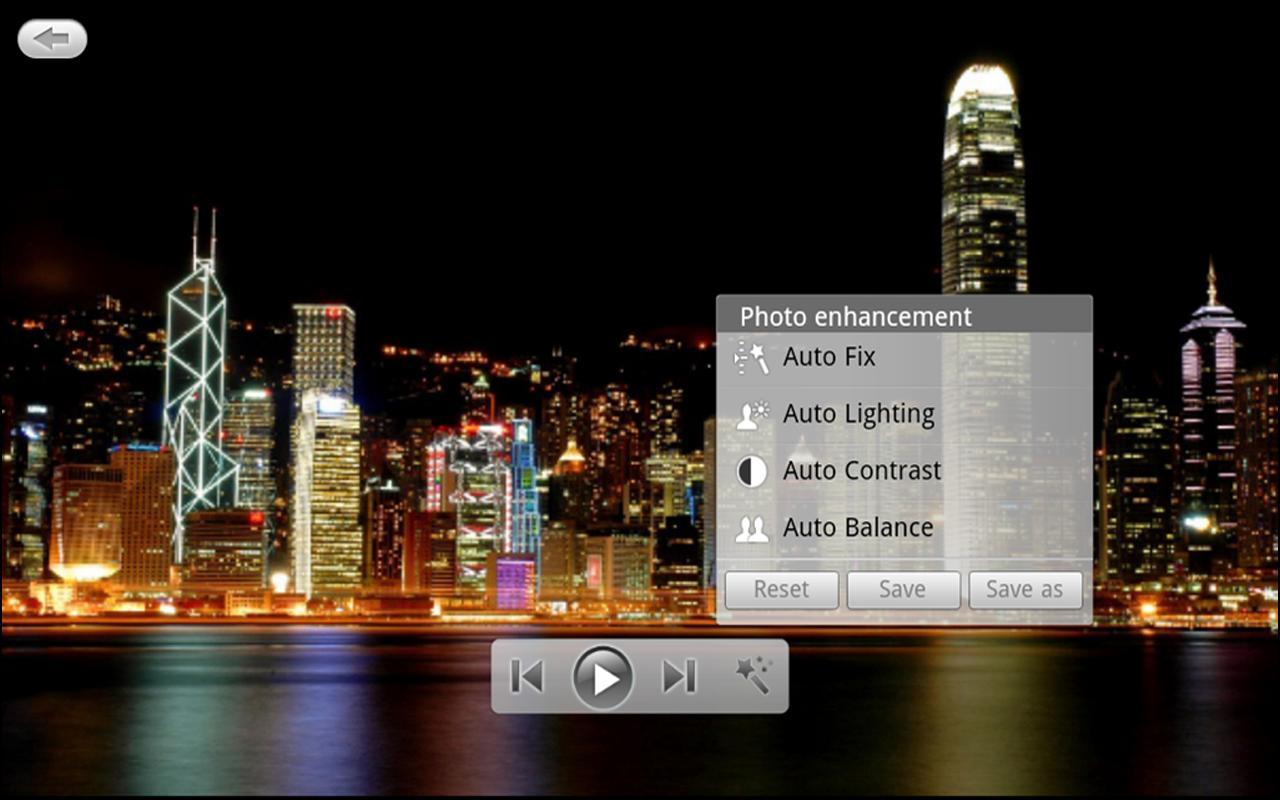
 PowerDVD Mobile v.4 v4.0.17944
PowerDVD Mobile is the perfect companion app to the PowerDVD 13 desktop product. When you’re on the move, PowerDVD Mobile lets you take your multimedia entertainment along.
Easy access from all your devices
Connect your media and your devices wirelessly with PowerDVD and PowerDVD Mobile. Access all your content, no matter on which device it is stored or on which device you play it. Take video on the go without worrying about complicated file conversions.
All-in-one Media Player for Movies, Photos, Music and Video
PowerDVD Mobile is also a powerful universal media player for enjoying all your media. Play back movies, music, photos and videos on your mobile device. Even improve your camera shots with easy one-click enhancements.
System Requirements
Android Version
- Operating System: Android 2.3 and above version, including 4.2 (Jelly Bean)
- Processor: Minimum 1GHz
- RAM: Minimum 512MB
- Supported Screen Resolutions: 800×480, 854×480, 960×540, 1024×600, 1280×800, 1920×1080, 2560×1600 (Nexus 10)
Format Support
- Format/Codec support is dependent on the capabilities of each Android device
- PowerDVD Mobile is designed for portable devices and does not support optical disc drives
What’s New
-Play multiple slideshow photos seamlessly as a playlist when played from PowerDVD.
-Enhance stability when streaming from PowerDVD.
https://play.google.com/store/apps/details?id=com.cyberlink.powerdvd.PDA111031_02
Download Zippyshare

Source : apkfullapps[dot]co
Read More..

Tuesday, October 29, 2013

Download Cashflow Mobile Finances 1 6 apk

Cashflow Mobile - Finances 1.6Cashflow Mobile - Finances 1.6
The mobile version of the famous game of financial training of Robert Kiyosaki.

Cashflow Mobile is a game based on the board game by Robert Kiyosaki where he teaches players to get better knowledge of money management and learn to implement techniques and advices about investments, the goal of the game is that players learn to achieve financial freedom.

By playing Cashflow Mobile you will acquire the skills to play and gain experience in the proper managing of money. Cashflow is a game that teaches you to think like rich people do and know how to use the money to get financial freedom. The main objective of the game is to get your passive income overcome your expenses, so that your money work for you, instead of you to work for the money.

Note: Cashflow Mobile is not associated or related in any legal form to Robert Kiyosaki or its brand Rich Dad Poor Dad. This is a game made by admirers of his work based on the knowledge given by Robert Kiyosaki in his books and games.

Cashflow Mobile - Finances - Screenshot 1 Cashflow Mobile - Finances - Screenshot 2 Cashflow Mobile - Finances - Screenshot 3 


Download From Apk Store


Read More..

Thursday, October 24, 2013

Mobile AntiVirus Security PRO APk three two two

Mobile AntiVirus Security PRO APk (3.two.two) - Now You Can Download  Mobile AntiVirus Safety PRO APk (three.two.two)  in Apk Archive - the very best Apk Site Downloader, thats android apps file has been archived and you can also download it for cost-free through the hyperlink at the finish of this post, if you dont know how to Download just Go to The Download Instruction to discover the way to get the android apps apk file you want to download, and do not overlook to leave a comment if you find anything wrong so we can review our archive and give it the very best for you all.


Description about Mobile AntiVirus Safety PRO APk (3.2.two)

Download AVG Mobile AntiVirus Security PRO these days and:

  • Scan apps, settings, files, and media in genuine time
  • Allow obtaining/locating your lost or stolen phone through Google Maps™
  • Lock and wipe your device to defend your privacy
  • Kill tasks that slow your device
  • Browse the Net safely and securely
  • Monitor battery, storage and information package usage on your device
  • Filter & block unwanted calls and text messages (SMS)
  • In addition, when installing the premium app, you also get:
  • App Locker – set up a password to handle access to specific apps and hold them secure at all times.
  • App Backup - backup apps from your device to your SD card so you can restore them whenever necessary.

AVG Mobile AntiVirus Safety PRO also:
  • Defends against malicious apps, viruses, malware and spyware
  • Identifies unsecure device settings and advises on how to fix them
  • Helps make sure contacts, bookmarks and text messages are protected
  • Checks media files for malicious software program and safety threats
  • Guards you from phishing attacks
  • Can be scheduled to run day-to-day, weekly, or on demand scans

Screenshot Of Mobile AntiVirus Security PRO APk (three.2.2)


apk archive

Download Mobile AntiVirus Security PRO APk (three.two.2) Here


Read More..